Every feature
Everything Ark does, on one page.
From the brief to the post: the parts everyone sees first, and the ones people only find a month in. Every clip below is the real app, not a mockup.
Plan
Before anything gets made: the brief, the plan, the copy.
One board for all the content
Every post, video and design for every client, by stage. Drag a card when it moves on, switch to a table or a per-client overview, and save the views you use.
A page for every piece
Client, type, post date and edit deadline at the top. The team, script, caption, links, review and history underneath.
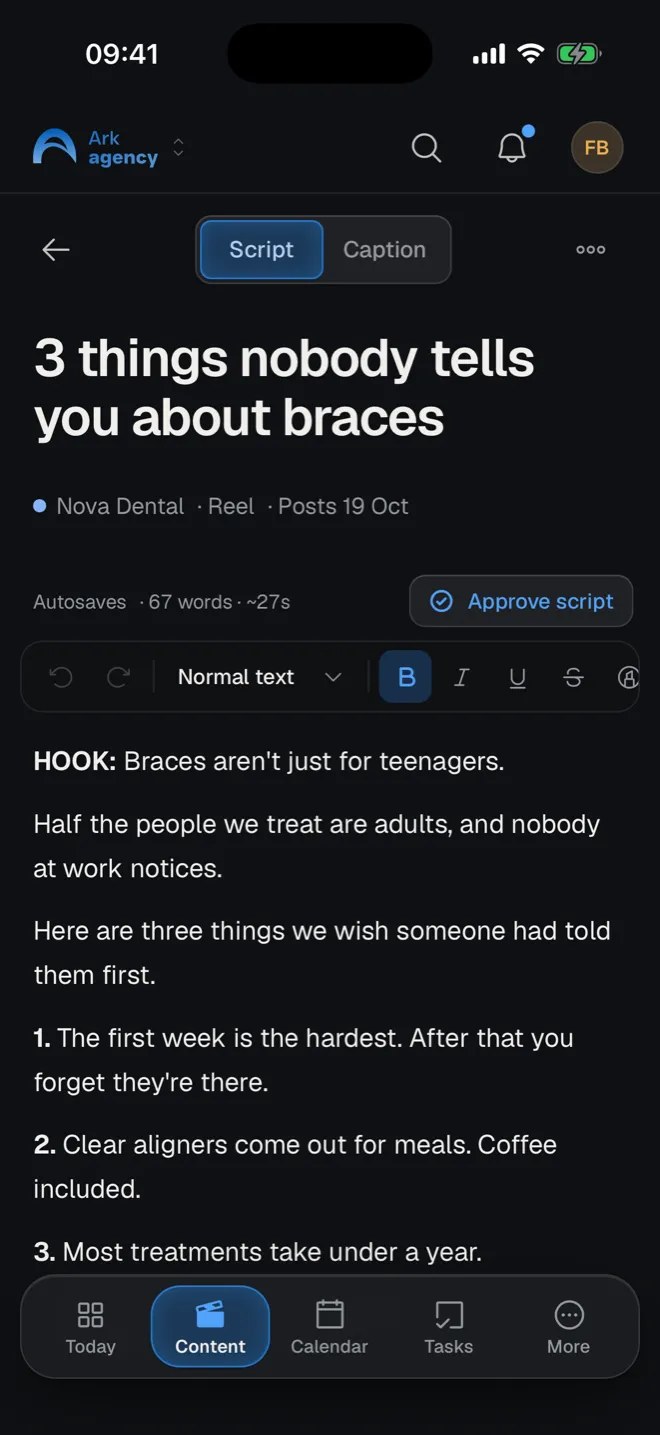
Scripts clients can comment on
Clients comment on the exact line. You reply, fix it, and they approve the script in Ark.
Briefs and shot lists
When, where, the client, the crew, a numbered shot list, gear and the client's notes, for every shoot.
A crew sheet to print
The brief as one page with boxes to tick on set. Print it, or open it on a phone.
Docs and notes
Brand voice, content pillars, meeting notes. Full docs, whiteboards and quick notes, shared with the team or just a few people.
Captions next to the script
Write the caption in its own tab on the same piece.
Links on every piece
Raw files, project files and final exports, one click away.
Scripts to PDF
Export a client's scripts, by stage, as one PDF with their links.
Saved views
Filters like “This month, Nova Dental, waiting on the client”, saved for you or the whole team.
Produce
On the busy days, and the ordinary ones.
Today
Open Ark and your tasks, your jobs and today's agenda are the first thing you see.
Tasks that belong somewhere
Sub-tasks, several people, a priority and a due date. Attach a task to a post, video, shoot, brief or meeting.
A work log that fills itself
Finished tasks and jobs log themselves. Add time by hand or run a timer, then see the team by day, week or month.
One calendar, synced with Google
Shoots, meetings and post dates for every client. Changes sync both ways with Google Calendar, and guests get the invite.
11 SOPs, ready to use
Written procedures for every step, in English and Romanian. Edit them, assign one to read, or add your own.
Your stages, your wayPro
Rename, reorder and recolour the stages, or start from a template: short-form video, simple approval, or design. Each stage knows whose queue the piece is in.
Jobs for every role
Writer, editor, videographer, social media manager: each person on a piece gets a job that ticks itself off when it moves on.
Deadlines that follow the post date
Move the post date and the edit deadline moves with it.
Notifications you choose
On your phone and desktop, only for the things you turn on.
Meetings
Client calls and shoot meetings on the same calendar, with Google Calendar invites for the guests.
Clients
Everything a client touches, in one place.
Free logins for clients
Clients log in for free and only ever see their own content, scripts, contracts and invoices.
Notes pinned to the second
Clients comment on the exact moment of a cut. Every version stays, so nobody argues about which one.
Feedback in two queues
Scripts waiting for approval and cuts waiting for review, side by side, so neither one gets forgotten.
Clients send you their logins
Send a link and the client types their Instagram, Meta or Mailchimp logins in themselves. No passwords in chats or email.
Logins only the right people see
Stored encrypted. You choose who on the team sees each client's logins, links expire, and every reveal is logged.
Contracts signed in Ark
Write, generate or upload a contract and send a signing link. Ark records the name, IP address, browser and a fingerprint of the exact text signed.
Delivery against the contract
Each client's page shows what the contract promises this month and what you've delivered, next to their content and briefs.
Invoices
Attach a PDF or a link; each client sees only their own.
Contract templates
Start from a template in English or Romanian, or save your own.
A brand profile per client
About the brand, voice and tone, and example scripts, for the team and for Ark AI.
A default team per client
New pieces for a client start with the people who usually work on them.
Client reports
A printable report for any period: what was posted, what's coming, shoots.
Deliverables from the contractPro
Ark AI reads a contract and fills in the monthly deliverables.
Publish & analytics
Approved means scheduled and the numbers come back.
Post from the video's page
Pick the channels, write the caption, order the carousel and see the post as it will look. When the client approves, Ark posts it on its date.
Analytics for every client
Followers, views, likes, comments and shares for the month, compared with the month before, with the posts that did best.
The whole agency, side by side
The Clients page shows the same five numbers across every connected profile, filtered by client, platform and date.
See the grid before it posts
The Instagram grid shows what's posted and what's coming, so the feed looks right before anything goes out.
Instagram, Facebook and TikTok
Connect each client's accounts once. Reels, posts, carousels, stories and TikToks.
Move the date, the post follows
Drag it in the calendar and the schedule moves too. Nothing goes out unapproved.
Formats per content type
Tell Ark that a Reel goes out as a reel on Instagram and a video on TikTok, once.
Review links
Send the client a link to see the posts as they will look and approve them.
Story stickers and reminders
Plan links, polls and mentions; Ark reminds whoever posts the story to add them.
Other channels by hand
Add any profile link and Ark reminds the team when it's time to post there.
Ark AI posts tooPro
It writes captions, adds media, reads the numbers and says what to post more of.
Run the agency
See how the whole agency is doing without asking around.
The agency at a glance
Active clients, content in progress, what was posted, overdue edits and time tracked this month, with tabs for team, content and delivery.
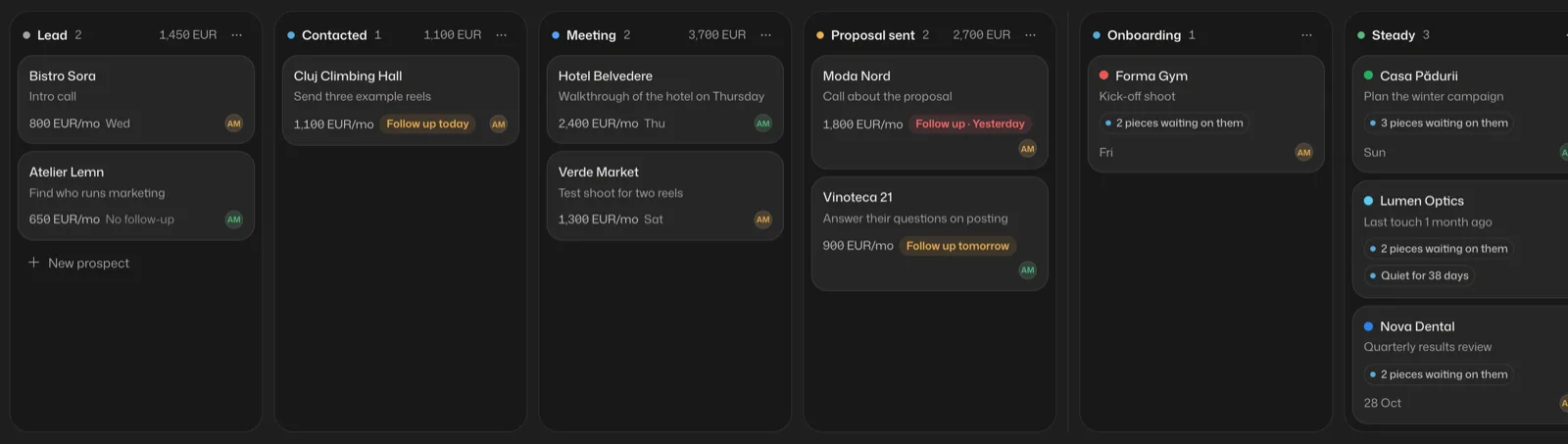
Prospects and clients on one board
The Clients page shows the whole journey. Prospects move from Lead to Contacted, Meeting and Proposal sent, with a follow-up date and what they would be worth a month. Drop one on a client column and it is won. Clients sit in Onboarding, Steady, Keep an eye on or At risk, with what Ark already knows on each card.
Find anything
Press ⌘K (Ctrl K on Windows) to jump to a task, client or post, ask Ark AI, or switch to light mode, without leaving the keyboard.
Roles and invite links
Admins, team members and clients, each invited with a link. Clients never take a seat.
A Relationship tab on every client
Who owns the client, the next step, overdue invoices or posts waiting on them, and every call and note.
Calls and notes on every prospect
Log a call, email, meeting or note, so anyone can pick up where you left off.
Follow-ups on Today
Prospects and clients you owe a follow-up show up on your Today page.
Access per person
Decide who sees the team's work log, time reports, the agency overview, prospects and team alerts.
Job titles
Writer, editor, social media manager: titles decide which jobs land in whose queue.
Several workspaces
One login for every agency or brand you run, each with its own clients and team.
Ark AI
An assistant that knows your workspace and asks before it changes anything.
Ask, and it answers from your workPro
What's late, what's due this week, how a client is doing. Every answer links straight to the task or post.
It acts with your OKPro
Creates and updates tasks, videos and docs, after you tap Allow.
It plans your weekPro
A plan for every client, drafted for you to review and add to the board.
It works in the backgroundPro
Ask for something bigger and it keeps going while you work; schedule a weekly plan.
It draftsPro
Contracts from a few answers, and SOPs and docs in the same shape as yours.
Everywhere
The same Ark on every screen.
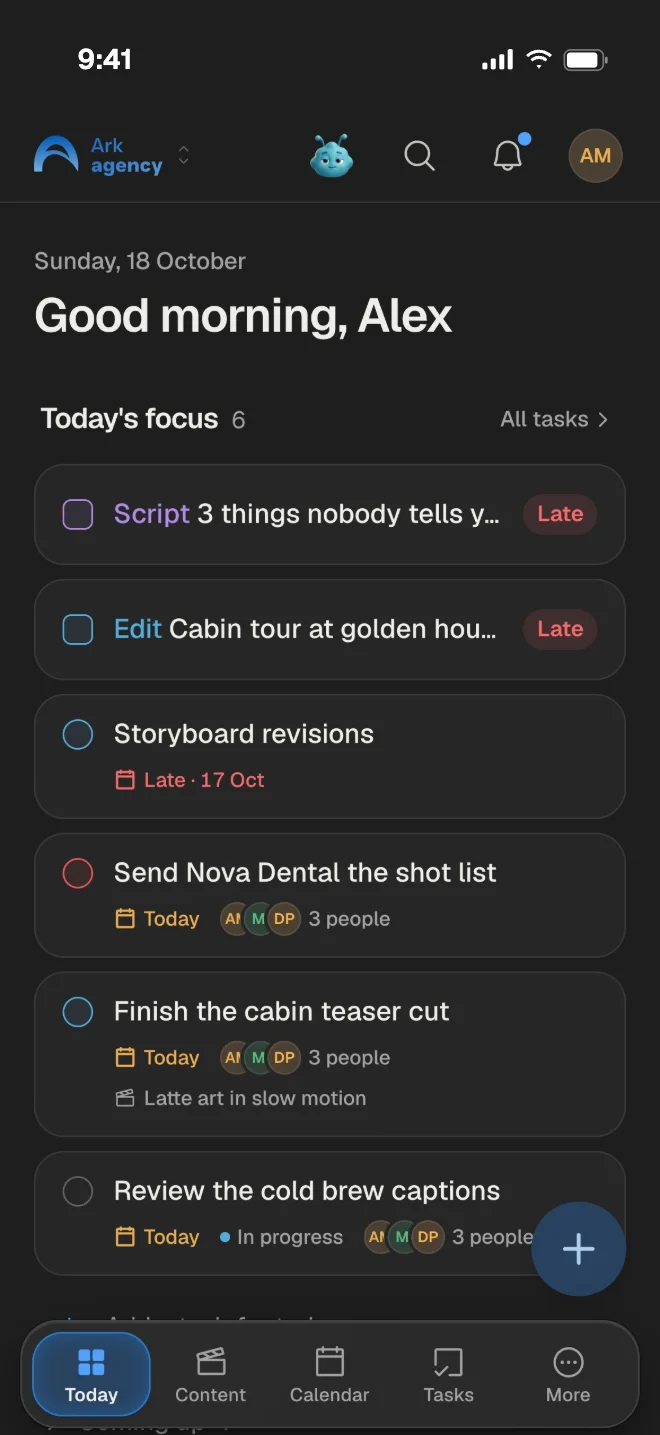
Made for a phone too
Today, the board, the calendar and approvals, laid out for a thumb. On a shoot, tick the checklist off as you go.
Light and dark
Pick one, or follow your device.
Keyboard shortcuts
Create, search and move around without the mouse.
Your data stays yours
Clients only see their own work, and logins are encrypted at rest.
Don't move everything. Start with one client.